How to Sync your Airbnb Calendar with VRBO & Booking.com
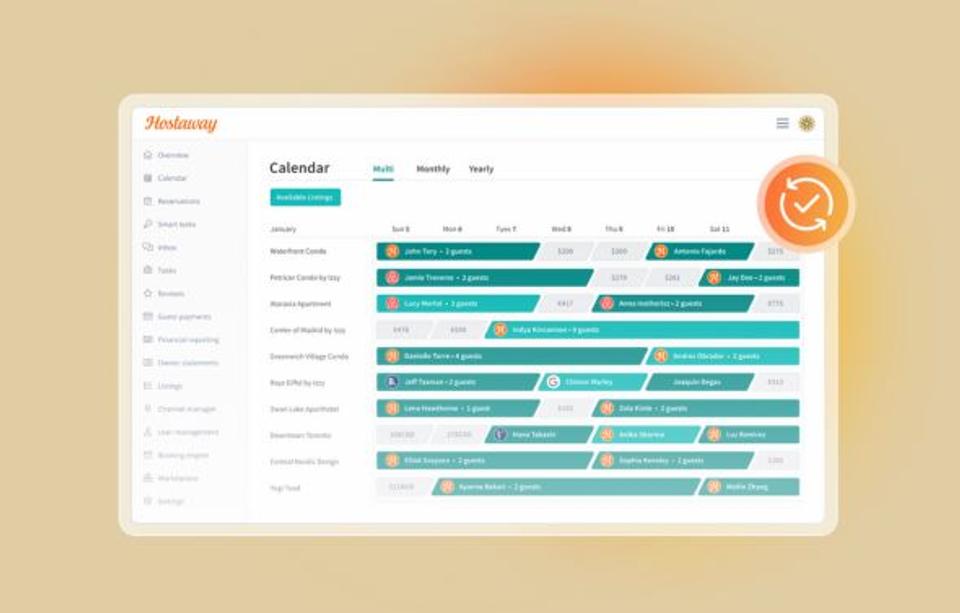

How to Sync Your Airbnb Calendar with Vrbo and Booking.com
To sync your Airbnb calendar with Vrbo and Booking.com, connect all three to one channel manager. A booking on any platform blocks those dates on the others right away, and you manage everything from one calendar.
Key takeaways
Airbnb checks imported calendar links every 3 hours. Vrbo checks every 30 minutes. A second guest can book your dates in that gap.
An API connection through a channel manager updates every platform the moment a booking comes in.
Once you're connected, delete your old calendar links. Leftovers cause duplicate blocks, and deleting them too early can reopen dates.
Make availability changes in your channel manager only. Edits made directly on Airbnb, Vrbo or Booking.com can get overwritten.
Calendar sync keeps your booked dates matched across every platform you list on, so the same property can't be booked twice for the same dates.
If you're on Airbnb, Vrbo and Booking.com, you already know the fear: two guests, one Saturday. Here's how to sync your Airbnb calendar with Vrbo and Booking.com so that stops being your problem.
Calendar links vs. API sync: which calendar sync method helps you avoid double bookings?
There are two ways to sync calendars across multiple platforms.
Calendar links are the built-in option. You copy a link from one platform, paste it into another, and each one checks the other on its own schedule.
API sync goes through a channel manager or property management software. It talks to each platform directly and pushes changes instantly.
| API sync (channel manager) | Calendar links |
What syncs | Bookings, availability and rates | Booked and blocked dates only |
How fast | Instantly | Every 3 hours on Airbnb, every 30 minutes on Vrbo |
Who updates it | The connection does | The platform, or you hitting refresh |
Risk of overlapping bookings | Low | Goes up every hour between refreshes |
The speed difference matters more than it looks on paper. Here's how a double booking actually happens with calendar links. A guest books your Saturday on Vrbo at 2 p.m. Airbnb doesn't see it until its next refresh, up to 3 hours later. Meanwhile, someone else books the same night on Airbnb.
Now you have to cancel one. If it's the Airbnb guest and check-in is 48 hours to 30 days away, Airbnb's host cancellation policy charges you 25% of the reservation, $50 minimum. Plus an unhappy guest.
How to sync your Airbnb and Vrbo calendars
Connect both to the same channel manager. Then clear out the old links.
Connect Airbnb and Vrbo through a channel manager
Connect Airbnb. Start the connection in your channel manager and log in to Airbnb to approve it. Import your listings or match them to ones you've already set up.
Request the Vrbo connection in your channel manager. Vrbo turns it on from its side, usually using an account ID your channel manager gives you.
Match each Vrbo listing to the right property.
Wait for Vrbo's approval. Once Vrbo approves the connection, your past and future Vrbo bookings move into your connected calendar.
A channel manager is additional software, so it makes sense to compare the monthly cost to what one cancelled booking costs you. After setup, when a guest books on Vrbo, Airbnb blocks those dates on its own. You don't have to touch either calendar.
Remove old calendar links from your Airbnb and Vrbo calendars
If you synced Airbnb and Vrbo with calendar links before, those links are still connected. They don't switch off when you set up your channel manager.
That leaves two systems blocking the same dates. Your channel manager updates instantly, and the old links keep updating on their slower schedule. When those two disagree, you get dates that stay blocked after a guest cancels, or bookings that show up twice.
Once your channel manager is running, delete the old links:
Make sure your bookings came over first. Open your connected calendar and check that every upcoming reservation is there. Deleting an old link releases the dates it was holding, so anything that didn't come over could become bookable again.
On Airbnb, go to Calendar, open your availability settings and find Connect calendars. The calendar address field shows where each imported calendar comes from. Delete the one from Vrbo.
On Vrbo, go to Calendar sync, then Manage imported calendars. Delete the one from Airbnb.
After that, your channel manager handles everything. You won't need to manually refresh a calendar or share your export calendar link again. Vrbo won't let you use Import a calendar on a listing managed through property management software anyway.
How to sync your Airbnb calendar with Booking.com
With Airbnb already connected, adding Booking.com takes a few more steps. The process starts in the Booking.com Extranet, where you pick your channel manager as your connectivity provider.
Connect Booking.com through a channel manager
In the Extranet, go to Account, then Connectivity provider. Find your channel manager and give it access.
In your channel manager, add the property with its Booking.com Property ID.
Match each Booking.com room to the right listing.
Check your rates and availability in both your channel manager and the Extranet after the first sync. Some things, like promotions, may still need to be set in the Extranet.
Now one change covers multiple channels. For example, blocking a week for a deep clean takes one edit, not three.
Remove the Airbnb calendar link from Booking.com
Same as with Vrbo, any calendar links you set up between Airbnb and Booking.com are still running. Booking.com calls these links third-party calendars. Delete them so your channel manager is the only thing updating your dates.
Make sure your bookings came over first. Check that every upcoming Booking.com reservation is in your connected calendar.
On Booking.com, go to Rates & Availability in the Extranet, then Calendar (or Calendar & Pricing), and click Sync calendars. Delete the imported calendar from Airbnb.
On Airbnb, go to Connect calendars in your availability settings and delete the one from Booking.com.
Only delete links for platforms you've connected to your channel manager. If you still sync another website through a calendar link, leave that one alone for now.
Not sure you've got the correct link? Paste the URL somewhere you can read the whole thing and check which site it points to. Once the old links are gone, your availability stays accurate across every connected platform.
Tips to keep your calendars accurate across platforms
Make your channel manager the source of truth
Once you're connected, make every availability change in one place: your channel manager.
Say you block a date directly on Airbnb. Your channel manager doesn't know about it, so the next time it syncs, it can reopen that date. You usually find out when a guest books the night you thought was closed.
The same goes for Vrbo and the Booking.com Extranet. If a date needs to open or close, do it in your channel manager.
Use Google Calendar for your schedule, not your listings
Lots of property managers like seeing bookings in Google Calendar next to their other calendars. Fine for planning your week. But blocking a date there does nothing on your booking platforms. Anything that needs to close dates goes in your channel manager.
Block owner stays and repairs the same day
Owner wants the weekend? Water heater's out? Block the dates the same day it comes up, even if the stay is months away. An open date is bookable, and guests book further out than you'd expect.
Block it in your channel manager, not on Airbnb or Vrbo. That way the dates close on every platform at once. Add a note to the block, like "owner stay" or "plumber booked," so anyone on your team knows why the dates are closed.
For repairs, block a day or two past the fix date. Repairs run late, and a buffer is easier than moving a guest. Once the work is done, unblock the extra days.
Test it
After any change to your syncing setup, block a test date on the same property. Check that it shows as unavailable everywhere. Then unblock it.
How Hostaway keeps Airbnb, Vrbo and Booking.com in sync
Hostaway's channel manager connects directly to Airbnb, Vrbo and Booking.com. A booking on one blocks the dates on the others instantly. You set availability and pricing once in your Hostaway calendar, and every channel updates.
Hostaway also holds the Triple Crown: the top partner status with all three platforms. That means Airbnb Preferred+ Partner, Vrbo Elite Connectivity Partner and Booking.com Premier Partner.
These aren't badges you can buy. Each platform grades its software partners on how strong and reliable the connection is, and how well the software keeps up as the platform changes. Only the best-performing partners reach the top tier.
For you, that means a sync you don't have to babysit. Bookings land where they should, dates close on every channel, and your connection keeps up when a platform changes how it works.
Want the details? Read how Hostaway's real-time channel sync works.
FAQs
How often does Vrbo sync an imported calendar?
Every 30 minutes, per Vrbo's help center. A new import can take up to 20 minutes to show up. But Airbnb only checks every 3 hours, so a Vrbo booking can take that long to block dates on Airbnb.
Can I sync my Airbnb calendar with Booking.com for free?
Yes, with calendar links. But they only share booked and blocked dates, and they're slow. Airbnb also caps how many times you can refresh manually. Hit the limit and you wait for the next automatic update.
What happens if two platforms receive the same booking at the same time?
With a channel manager, the first confirmed booking blocks the dates everywhere. The second guest sees them as unavailable. With calendar links, both bookings can go through, and you'll have to cancel one.
Will switching to a channel manager affect my existing reservations?
No. Your reservations come over when you connect each platform. Just watch the cleanup. Dates held only by a calendar link can reopen when you delete it, so re-block anything that didn't carry over.
Can I sync more than two booking platforms at once?
Yes. A channel manager puts Airbnb, Vrbo, Booking.com and other channels on one calendar. With calendar links, three platforms means six separate imports, and Vrbo lets you import only five calendars per property.
How do I check whether Hostaway synced a change to Booking.com?
Open the listing in Hostaway, go to Channel Connections, pick Booking.com and check Sync History. It shows every update and flags errors by date. Start there if a change isn't showing in the Extranet.
Ready to find out how Hostaway can transform your business?



Validated PCI DSS v4.0.1 Level 1 Service Provider.


