The Ultimate Guide to Airbnb Cancellation Policy for Vacation Rental Hosts


Key Takeaways
Airbnb's 2026 short-stay policies are Flexible (24h), Moderate (5d), Firm (30d) and Limited (14d).
Guests who book 7 days or more before arrival get a 24-hour post-booking grace period for a full refund across short-stay policies.
Date-specific cancellation policies now let US hosts assign a different policy to specific date ranges on the same listing instead of one policy for the whole year.
The non-refundable rate lets you keep the full payout if guests cancel and works best when paired with Flexible/Moderate/Limited to balance conversion and protection.
Airbnb's regional rules can override global policies, so hosts must stay aware of local laws in markets like California, Germany and South Korea to remain compliant and avoid refund disputes.
Airbnb's cancellation policies for short stays are Flexible (24h), Moderate (5 days), Firm (30 days) and Limited (14 days). The platform also offers a 24-hour grace period to guests to cancel after booking, if the reservation was made 7 days or more before check-in.
In this guide, we take a deep dive into the different cancellation policy options available to Airbnb hosts, how they work, why they matter, and how to apply them to your best advantage, including Airbnb's newer feature for setting cancellation policies by date. We also explore the regional differences in Airbnb cancellation policy and practical tips for how to avoid cancellations as well as respond to them.
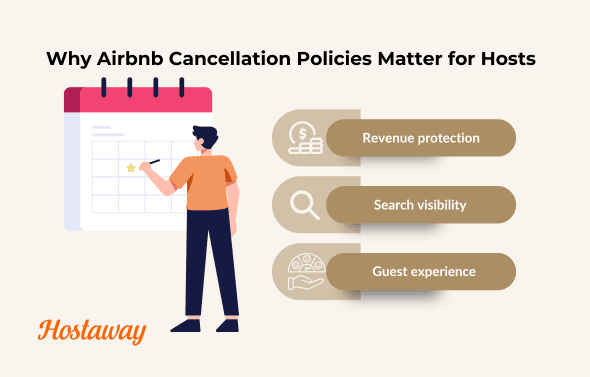
Why Airbnb cancellation policies matter to hosts
A good cancellation policy doesn't just manage risk. It influences how your listing performs, how guests perceive your reliability and whether your calendar fills with the right bookings at the right price.
The policy you choose impacts your business in three major ways:
1. Revenue protection
A poorly matched policy can lead to unpaid gaps, lost nights or refunds you didn't budget for. Flexible terms may increase booking volume, but they can also lead to higher guest churn. Finding the right balance helps you avoid revenue dips without making guests feel boxed in.
2. Search visibility
Airbnb's algorithm often favors guest-friendly listings with free cancellation, especially during early booking stages. That means your cancellation policy can directly affect how often your listing appears in search results. More visibility often leads to more confirmed reservations, which supports stronger financial performance.
However, more visibility doesn't always equal better results. A highly flexible policy may attract guests who book impulsively or cancel last minute, leaving you with calendar gaps you can't recover. The key is balancing visibility with the kind of guest behavior your business can realistically absorb.
3. Guest experience
Clear, fair cancellation terms help set expectations. When guests understand the refund rules before they book, it builds trust and minimizes misunderstandings if they need to cancel. This also supports a smoother guest journey and can reduce negative reviews.
If you're managing multiple properties or optimizing for strong direct booking channels, the policy you choose is a key part of a broader, thoughtful revenue strategy. It should align with your seasonality, audience and availability, not just platform defaults.
Airbnb cancellation policy at a glance
Policy | Full refund deadline | Partial refund window | No-refund window | Best for |
Flexible | ≥ 24 hours before check-in | < 24h: first night non-refundable, remaining nights refunded | - | High-demand, short lead |
Moderate | ≥ 5 days | < 5 days: 1st night + 50% of remaining nights | - | Balance of volume & protection |
Firm | ≥ 30 days | 7–30 days: 50% | < 7 days | Seasonal/advance bookings |
Limited (NEW) | ≥ 14 days | 7–14 days: 50% | < 7 days | Middle ground post-Strict |
Firm Long-term (28+ nights) | ≥ 30 days | - | < 30 days | Extended stays |
Strict Long-term (28+ nights) | ≥ 28 days; within 48 hours of booking | - | < 28 days | High-commitment monthly/luxury rentals |
Note: A 24-hour post-booking grace period (when booked ≥ 7 days before check-in) applies across short-stay policies. Since Airbnb's date-specific cancellation policy rollout, any of the four short-stay policies above can also be applied to a specific date range rather than the whole calendar.
A deep dive into Airbnb's cancellation policy options for short-term stays
Airbnb currently offers several standard policies that hosts can apply to stays of less than 28 consecutive nights.
Flexible cancellation policy
Guests get a full refund if they cancel at least 24 hours before check-in. Cancel after that window opens, and the first night becomes non-refundable though the cleaning fee is still returned if the guest never checks in at all. This is the most guest-friendly policy on the platform and tends to work best for city apartments and other short lead-time markets, especially on weekdays during shoulder season when you're competing hardest for bookings.
Pro Tip: Pair Flexible with the non-refundable rate option so price-sensitive guests can still commit upfront in exchange for a discount.
Moderate cancellation policy
Full refund applies up to 5 days before check-in. Inside that window, guests forfeit the first night and get 50% of the remaining nights back. It's a reasonable middle ground for metro and suburban homes booked 1–3 weeks out, and it holds up well for family weekend trips where lead times are short but not last-minute.
Pro Tip: Offer the non-refundable rate up to 5 days out, and use rules-based automation to adjust minimum-stay requirements and last-minute discounts to backfill any gaps that open up.
Firm cancellation policy
Guests need to cancel at least 30 days out for a full refund. Between 7 and 30 days, they get half back; inside 7 days, nothing. This level of protection suits beach and ski markets, along with any listing exposed to event-driven demand where last-minute cancellations are the most expensive to absorb.
Pro Tip: During your highest-demand weeks, lean on Firm and skip the non-refundable option. If you're already expecting to sell out, you don't need the extra incentive.
Limited cancellation policy
Full refund up to 14 days before check-in; 50% back between 7 and 14 days; nothing inside 7 days. Limited fills the gap Airbnb left when it retired Strict, and works well for destinations with 2–6 week booking lead times or for hosts transitioning off Super Strict.
Pro Tip: Combine limited with the non-refundable rate to protect revenue without hurting your visibility in Airbnb search.

How date-specific cancellation policies change the calculation
Until recently, a listing's cancellation policy applied to every date on the calendar year-round. Airbnb now lets hosts set cancellation policies directly from the calendar, applying a different policy to specific date ranges rather than being locked into one policy for the whole listing. If a booking spans dates with two different policies, the policy tied to the guest's check-in date is the one that applies.
How it works:
Hosts set a specific date range on the calendar, then apply a different cancellation policy to just those dates, everything else keeps following the listing's default policy.
If a booking spans two different date-range policies, the policy tied to the guest's check-in date is the one that applies.
Changes only apply going forward, existing or pending reservations keep whichever policy was in effect when they were booked.
Regional consumer-protection rules (like California's 24-hour law) still apply on top of whichever policy is active for a given date.
Where it's most useful: protecting a small number of high-value dates without sacrificing flexibility everywhere else like running Moderate as the default, for instance, and switching to Firm or Limited for 10–20 peak dates like holiday weekends or a local festival.
It also interacts with Reserve Now, Pay Later, which only appears on listings running Flexible or Moderate. A seasonal override to Firm or Limited on peak dates removes that exposure exactly where you need to.
Pro Tip: If you already run different pricing or minimum-stay rules by season, keep your cancellation-policy date ranges aligned with them so a "protected" peak weekend isn't accidentally left on a Flexible policy.
A deep dive into Airbnb's cancellation policy options for long-term stays
Firm long-term cancellation policy
Guests get a full refund if they cancel 30 or more days before arrival. Cancel inside that window, and the first month becomes non-refundable, though nothing beyond that is charged. Once the guest has checked in, ending the stay early requires 30 days' notice, without it, they still owe the next 30 nights. This policy tends to work well for digital nomads, students, travel nurses, and relocation stays, where guests want some flexibility but hosts still need protection against a sudden, hard-to-refill gap.
Strict long-term cancellation policy
A full refund only applies if the guest cancels at least 28 days before arrival and within 48 hours of booking a narrower window than Firm's. The same 30-day notice rule applies after check-in. Strict long-term suits luxury or high-commitment monthly rentals, or any host managing limited inventory who can't absorb an empty month.
Pro Tip: Long-term cancellations are rarer than short-stay ones, but far costlier when they happen. Track notice periods closely and keep availability synced across every channel you list on.
on.
What is the non-refundable option on Airbnb and how to use it
Airbnb also lets you offer a discounted, non-refundable rate, typically around 10% off, for stays under 28 nights. Guests who choose it can't cancel for a refund, so if they do cancel, you keep the full payout minus the cleaning fee. A few conditions apply: the reservation has to check out within 60 days of booking to qualify, and it can't be combined with pre-approval or special-offer bookings. Guests can still get a refund if a Major Disruptive Event affects their trip, regardless of rate type.
It tends to work best during shoulder seasons or in competitive urban and short-stay markets, where guests are price-sensitive but you still want some protection against last-minute cancellations. It's also a good fit for hosts running promotions who don't want to sacrifice cancellation coverage to do it.
Regional exceptions and country-specific differences
California (United States)
Since July 1, 2024, California law has granted guests a 24-hour free-cancellation period for all reservations confirmed at least 72 hours before check-in, regardless of the host's selected policy. Timing is based on Pacific Time.
Pro Tip: This adds an extra "grace window" on top of Airbnb's global 24-hour rule.
Germany
Hosts must ensure their chosen policy complies with local civil-code (BGB) consumer regulations, which restrict excessive forfeitures when a guest cancels. Airbnb recommends Flexible for most home hosts. Pro Tip: Document cleaning or prep costs and keep refund reasoning clear in messages.
South Korea
Airbnb applies a localized version of the Super Strict policy for bookings made by South Korean travelers, with a 12 p.m. local-time cutoff governing partial-refund calculations.
Region | Special Rule | Effective Date | Key Notes |
California (US) | 24-hour free cancellation if booked ≥72h before check-in | Since July 1, 2024 | Applies automatically; Pacific Time cutoff |
Germany | Refunds must be proportionate to actual losses | Ongoing | Airbnb recommends Flexible policy |
South Korea | Modified Strict policy with local refund cutoffs | Ongoing | Refund up to 30 days; 12 p.m. cutoff applies |
Note: Regional rules still apply on top of whichever cancellation policy is active for a given date.
South Korea
To comply with South Korean consumer regulations, Airbnb applies a localized version of the Super Strict policy for bookings made by South Korean travelers.
Why regional awareness matters
Local laws always supersede platform policy. For global property managers:
Review every listing’s region to see if local rules override standard Airbnb terms.
Maintain localized message templates clarifying refund timing and fee treatment.
Sync policy data automatically in your PMS so that country-specific adjustments apply without manual edits.
Pro Tip: Use your Hostaway dashboard to tag listings by region and map policy variants. This ensures guests see accurate information at checkout and helps you stay compliant across multiple jurisdictions.
Region | Special Rule | Effective Date | Key Notes |
California (US) | 24-hour free cancellation if booked ≥ 72h before check-in | July 1, 2024 | Applies automatically; Pacific Time cutoff |
Germany | Refunds must be proportionate to actual losses | Active | Airbnb recommends Flexible policy |
South Korea | Modified Strict policy with local refund cutoffs | Ongoing | Refund up to 30 days; 12 p.m. cutoff applies |
Italy | Pre-2025 bookings follow unique 12 p.m. cutoff system | Until Oct 1, 2025 | Complex refund schedule; transitioning soon |
How to Update or Change Your Cancellation Policy on Airbnb
Now that you know more about how Airbnb’s cancellation policies work and how they affect your revenue, visibility and guest experience you might be ready to adjust your settings.
Step-by-step guide to changing your Airbnb cancellation policy
Log in to your Airbnb account and go to your Host Dashboard.
Click on “Listings” in the top menu and choose the listing you want to update.
Scroll down to the “Policies” section and find “Cancellation Policy.”
Click Edit, then choose from the available policy options:
Click Save to confirm your changes.
Note: Some cancellation policy types, like Super Strict 30 or Firm Long-Term, may only be available to select hosts, depending on region, listing category or if you're using a property management system (PMS).
Tips before you make a change
Check existing reservations. Policy changes only apply to new bookings. Existing confirmed reservations will still follow the policy in place at the time of booking.
Consider guest experience. Sudden changes to a limited cancellation policy might impact booking volume or guest trust.
Changing your policy can be a small move with a big impact. When used strategically, it helps improve your financial performance, reduce disputes and support a smoother guest journey, especially when paired with strong communication and reliable automation tools.
When Can Airbnb Refund Guests Despite Your Cancellation Policy?
While your cancellation policy sets the general rules, guests may still be eligible for a refund under certain conditions, especially when Airbnb’s broader Guest Refund Policy comes into play. Understanding when and why guests can request a refund helps you stay prepared and avoid unpleasant surprises.
Here are the most common refund scenarios:
1. Cancellation within the policy window
If a guest cancels within the allowed timeframe based on your policy (for example, five days before check-in under the moderate policy), Airbnb will issue a refund automatically.
2. Problems with the listing
Guests may be eligible for a refund if your listing:
Is significantly different from the description
Is unsafe or unsanitary
Doesn’t allow check-in (e.g., lockbox doesn’t work, wrong address, etc.)
In these cases, Airbnb can override your selected your policy and issue a refund directly to the guest. These decisions are often made quickly, so accurate listing details and strong communication are key.
3. Major disruptive events
Airbnb’s Major Disruptive Events Policy allows guests to cancel and request a refund if they are affected by events beyond their control. This includes natural disasters such as earthquakes or floods, government-imposed travel restrictions, public health emergencies and sometimes military action or civil unrest.
These events must be officially verified and must directly impact the guest’s ability to complete their reservation. Airbnb may step in to process a refund even if the host's policy would normally prevent it.
4. During the stay
If a guest reports a serious issue after check-in, Airbnb may issue a refund for the remaining nights, depending on the severity of the issue. This could apply to unresolved maintenance problems, safety concerns or violations of Airbnb’s guest-first experiences standard. In these cases, documentation and prompt host response are critical.
What Airbnb hosts should know
Refund decisions often come down to communication and documentation. Respond quickly, provide proof where needed and keep your listing information up to date.
Guests may also be refunded cleaning fees, service fees or other charges depending on the situation.
Airbnb always reserves the right to override your cancellation policy in exceptional cases, particularly when the guest experience is at risk.
Being proactive, transparent and solution-oriented helps you avoid refund disputes and maintain control over your hosting experience

What Happens When an Airbnb Host Cancels a Booking? Airbnb Host Cancellation Penalties Explained
Airbnb’s cancellation penalties aren’t just there to protect guests, they’re designed to maintain trust across the platform. When Airbnb hosts cancel confirmed reservations, especially without a valid reason, it can disrupt travel plans and damage Airbnb’s guest experience. That’s why hosts are subject to a range of penalties depending on the circumstances.
Here’s what you need to know.
What happens when you cancel an Airbnb reservation?
If you cancel a booking as a host, Airbnb may apply one or more of the following:
Financial penalties: A cancellation fee is deducted from your next payout. This is typically between $50 and $100, depending on how close to check-in the cancellation occurs.
Calendar block: Airbnb will block the canceled dates from being rebooked, which can limit your income.
Superhost status: If you cancel too many bookings, you may lose your Superhost eligibility.
Reduced visibility: Airbnb’s algorithm may lower your listing in search results if you cancel frequently.
These penalties apply even if the booking was inconvenient unless the cancellation meets Airbnb’s criteria for a penalty-free exception.
When Host Cancels | Fee | Other Consequences |
> 30 days before check-in | 10% (min $50) | May affect visibility |
48h–30d before check-in | 25% | Calendar blocked for those dates |
≤ 48h before check-in | 50% | Calendar blocked + possible Superhost loss |
Valid documented reason | $0 | No penalties applied |
When can hosts cancel a booking without penalty?
While canceling a confirmed reservation is never ideal, Airbnb understands that some situations are out of a host’s control. In certain cases, you can cancel without facing financial penalties, calendar blocks or losing your Superhost status, as long as the reason meets Airbnb’s official criteria and you provide proper documentation.
Here are the most common situations where hosts may cancel without penalty:
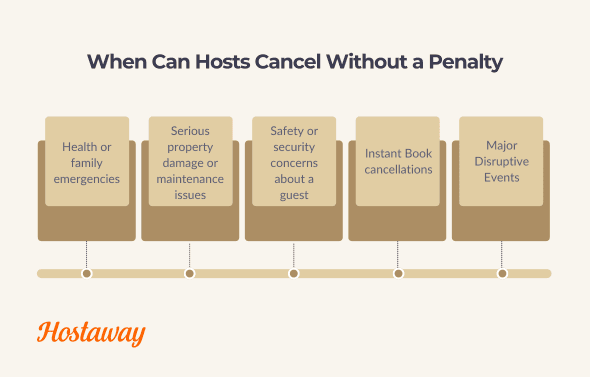
1. Health or family emergencies
If you or someone in your household experiences a medical emergency that affects your ability to host, Airbnb may waive any cancellation penalties. You will need to provide documentation, such as a doctor’s note or hospital record and notify Airbnb as soon as possible.
2. Serious property damage or maintenance issues
If your listing becomes uninhabitable due to things like fire, flooding or a major plumbing failure, you are allowed to cancel. Airbnb typically requires supporting evidence, such as photos or repair estimates, to confirm the issue.
3. Safety or security concerns about a guest
If a guest appears unverified, behaves in a suspicious way or gives you reason to believe they intend to host a party or violate your house rules, you can cancel without penalty. In this case, you must provide documentation to Airbnb, such as screenshots of messages or anything that demonstrates your concern.
It’s important to know that you can’t cancel simply because a guest seems “off,” forgot to include full details or gave you a bad feeling without evidence.
4. Instant Book cancellations
If a reservation was made using Instant Book, Airbnb gives hosts some flexibility. You are allowed to cancel up to three Instant Book reservations per year without penalty provided you have a valid reason. These include:
A guest with no profile photo or completed profile
Suspicious communication or unclear booking intent
Negative reviews from other hosts
Concerns about potential parties or rule-breaking behavior
After three cancellations, Airbnb may disable Instant Book for your listings or apply penalties. If you cancel more than what Airbnb considers reasonable, it may also impact your visibility in search.
5. Major disruptive events
If a natural disaster, government travel restriction or public emergency makes it unsafe or impossible to host, Airbnb may waive cancellation penalties.
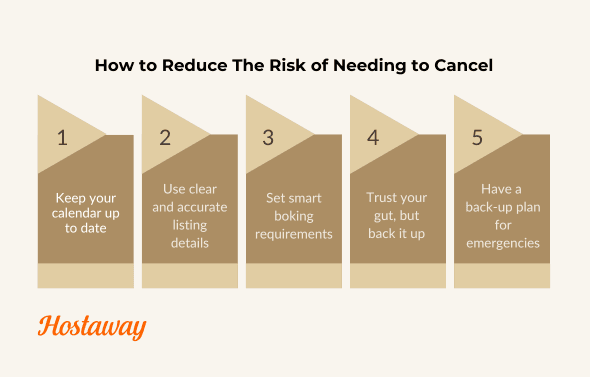
How to avoid having to cancel a booking on Airbnb
The best way to avoid the stress, penalties and potential guest issues that come with cancellations is to prevent them in the first place. While no hosting experience is completely risk-free, there are clear steps you can take to reduce the likelihood that you’ll need to cancel a reservation.
Here’s how to stay ahead of problems and protect your calendar.
1. Keep your calendar up to date
One of the most common reasons hosts cancel is because the calendar wasn't properly updated. Make it a habit to regularly review your availability, especially if you're also listing on other platforms. If you use a property management system like Hostaway, you can sync calendars and automate availability across platforms to avoid double bookings.
Momentum Cabo, for example, credits this kind of cross-platform sync with removing the discrepancies that used to force manual fixes across their 55+ listings, one less reason a booking ever needs to be cancelled after the fact.
2. Use clear and accurate listing details
Unexpected cancellations often start with a mismatch in expectations. Make sure your listing description, amenities and house rules are completely up to date. Include specific details about things like parking, stairs, Wi-Fi speed, pet policies and quiet hours. The more transparent you are, the more likely you are to attract the right guests and avoid misunderstandings.
3. Set smart boking requirements
Adjust your booking settings to filter out guests who don’t meet your standards. You can:
Require profile verification and government ID
Block last-minute bookings if you’re not ready to accommodate them
Use the “trip purpose” question to learn more before accepting
With Hostaway, you can add automate guest screening early and clarify expectations before a reservation is confirmed.
4. Trust your gut, but back it up
If something about a booking feels off, look for specific evidence. Are the guest’s messages vague or inconsistent? Do they avoid answering questions or have poor reviews? If so, it’s better to flag the issue early or contact Airbnb Support before it becomes a bigger problem.
5. Have a backup plan for emergencies
Things happen, plumbing fails, cleaners cancel, weather takes a turn. Keep a short list of trusted local contacts (cleaners, handymen, keyholders) who can step in last-minute if something goes wrong. Even just having a plan for emergencies can help you avoid needing to cancel.
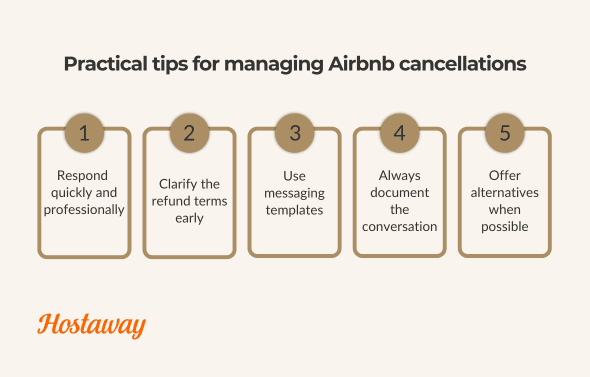
5 Tips for Managing Airbnb Cancellations
Whether a cancellation is initiated by the guest or required on your end, how you manage it can shape everything from your reviews to your visibility in search. Even when a cancellation is unavoidable, you can still turn it into a positive guest experience or at the very least, a neutral one.
Here are some tips to help you stay calm, clear and in control when a cancellation comes up.
1. Respond quickly and professionally
Guests often feel stressed when plans change. A fast, courteous response helps reduce tension and shows that you’re committed to helping. Use friendly, human language and avoid anything that sounds defensive or impersonal.
“Thanks for reaching out. I understand your situation and I’ll do what I can to help clarify the next steps.”
This kind of tone keeps guests cooperative, even if a refund isn’t guaranteed.
2. Clarify the refund terms early
Refer back to your cancellation policy as soon as the issue comes up. This helps manage expectations and keeps the conversation aligned with Airbnb’s official terms. If a partial refund is possible, let the guest know clearly. If the booking is non-refundable but you’re still offering a goodwill gesture, communicate that directly.
Being transparent early helps prevent misunderstandings later.
3. Use messaging templates
If you receive frequent cancellation or refund requests, save time by using message templates. This helps you keep a consistent tone and makes it easier to respond quickly. Airbnb allows you to create these in-platform. If you're using a property management system like Hostaway, you can automate these replies based on reservation status.
Messaging templates you can use:
Guest cancels within the refundable window
Thanks for the heads-up, {Name}. You’re within the {Policy} refund window, so Airbnb will process your refund automatically. If you need a receipt or help rebooking different dates, happy to help!
Guest cancels outside the window (goodwill partial)
Hi {Name}, I understand plans change. Our policy (visible at checkout) doesn’t allow a full refund at this stage. As a goodwill gesture, I can offer {X% refund/rebooking credit} if we can rebook your dates. Let me know if you’d like me to try opening them up now.
Listing issue reported after check-in
I’m sorry you’re experiencing this. I’ve alerted our local team and can have {tech/cleaner} out by {time}. If we can’t resolve quickly, I’ll work with you and Airbnb on fair next steps.
You must cancel for a valid reason
Unfortunately, due to {concise reason} I am forced to cancel this booking. I’m submitting documentation to Airbnb to verify my circumstances and will help you find comparable alternatives for your dates.
4. Always document the conversation
Keep all communication on the Airbnb platform. If a dispute arises, Airbnb Support will review your message history as part of their decision. Documenting everything ensures you’re protected.
5. Offer alternatives if possible
If you have another unit or know a nearby host with availability, offering an alternative shows that you care about the guest's experience. Even if they don't take the offer, the gesture matters and may positively affect how they review the situation.
What to avoid
Don’t create a false reason to cancel. Airbnb can detect this and may apply penalties.
Don’t encourage the guest to cancel so that you avoid penalties. This violates Airbnb’s policy and can lead to account restrictions.
Don’t respond emotionally. Even if a request seems unfair, stay calm, stick to the facts and communicate professionally.

Making Airbnb's cancellation policy work for you
Your edge now comes from matching policy to seasonality, pairing with non-refundable rates, and communicating plainly at every stage. Date-specific cancellation policies make that seasonality-matching native to Airbnb rather than something you approximate manually, identify your highest-value dates, protect them with a date-specific override, and keep a workable default everywhere else.
FAQs
What are the main Airbnb cancellation policies for short stays in 2025?
Flexible (full refund ≥ 24h), Moderate (≥ 5d), Firm (≥ 30d) and Limited (≥ 14d). Strict is being phased out for new listings. A 24-hour grace period after booking applies if the reservation was made 7 days or more before check-in.
What exactly is the 24-hour post-booking grace period?
For bookings made 7 days or more before arrival, guests can cancel within 24 hours of booking for a full refund, regardless of the policy (Flexible/Moderate/Firm/Limited) you’ve chosen.
What is the new “Limited” policy and who should use it?
Limited grants a full refund for cancellations14 days or more before the scheduled check-in; a 50% refund for cancellations between 7 and 14 days of the scheduled check-in and no refund for cancellations less than 7 days from the scheduled check-in. It’s ideal for hosts who want a middle ground between Moderate and Firm, especially ex-Strict hosts.
What happens to listings that previously used Strict?
Strict has been retired for new listings. Existing Strict setups may be migrated (typically toward Firm) or restricted regionally; check your settings and timelines to make sure.
Do long-term stays (28+ nights) follow different rules?
Yes. Long-term policies override short-stay rules.
Firm Long-Term (default): Full refund ≥ 30 days; if < 30 days, first month is non-refundable; after check-in, a 30-day notice is required to shorten the stay.
Strict Long-Term (limited availability): Adds 50% tiers (7–30 days), with the same 30-day notice requirement after check-in.
Can Airbnb refund a guest even if my policy says no?
Yes. Airbnb may override policies for Major Disruptive Events (e.g., disasters, travel bans) or serious listing issues (safety, inaccuracy, access problems). Keep details accurate and all communication on-platform.
What are the penalties if I cancel as a host?
Expect a fee (scaled by timing), calendar blocks for canceled dates, potential search visibility impact and Superhost status consequences. Certain documented emergencies and platform-approved reasons can be penalty-free.
Do time zones matter for cancellation cutoffs?
Yes. Deadlines and grace periods are calculated using the listing’s local time. Some regions (e.g., Italy for reservations booked before Oct 1, 2025) apply a 12:00 p.m. cutoff standard.
Does canceling affect my chances of keeping Superhost status?
Yes, Superhost status requires a host-initiated cancellation rate below 1% over the trailing 12 months, with exceptions for Major Disruptive Events or other documented valid reasons.
Is the guest service fee refundable if I cancel?
It depends entirely on timing: the service fee is refundable if you cancel within your reservation's free-cancellation period, or if your host chooses to refund you in full afterward. Outside that window, it's typically non-refundable.
Can a guest or host still leave a review after a cancellation?
Only if the cancellation happens on or after the day of check-in. If it's canceled any time before check-in day, neither party can leave a review at all.
Does the 24-hour cancellation grace period apply to Experiences and Services too?
No, that grace period is specific to home stays. Experiences and Services run on their own cancellation window instead: most allow a full refund up to 24 hours before start time, though some carry a longer 72-hour window.
Ready to find out how Hostaway can transform your business?



Validated PCI DSS v4.0.1 Level 1 Service Provider.


